Affilliate Disclosure
This article may contain affiliate links. I may earn a commission at no extra cost to you.
If your laptop webcam makes you look soft, poorly framed, or stuck in one position, upgrading to a dedicated camera can make a noticeable difference. But not every 4K webcam is worth the extra money. The real question is whether smart tracking, PTZ movement, better microphones, and advanced software actually improve your everyday workflow.
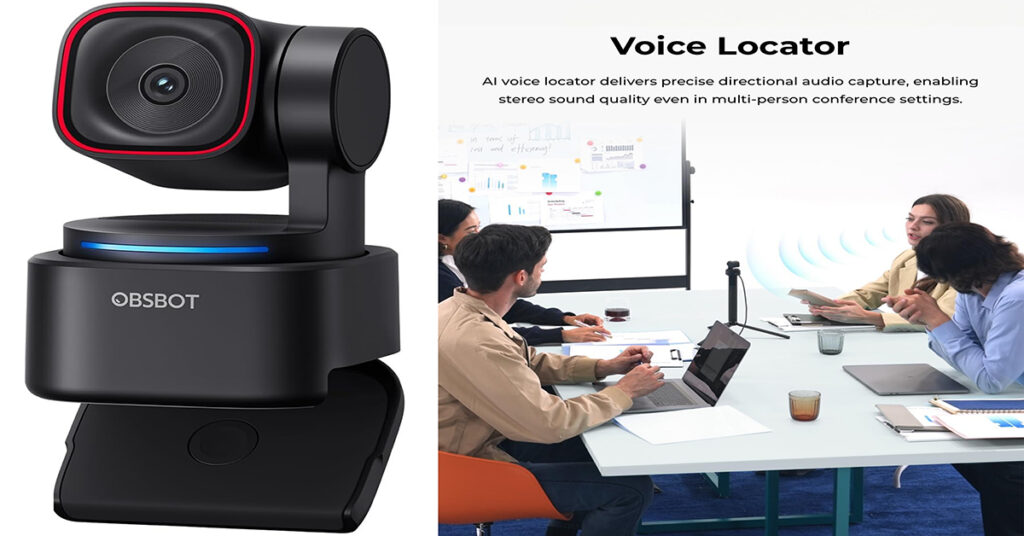
The OBSBOT Tiny 3 Lite AI-Powered Spatial Audio 4K Webcam is designed for exactly that situation. It combines 4K video, AI tracking, a two-axis gimbal, a three-microphone system, gesture and voice controls, and OBSBOT Center software in a compact USB webcam.
One important clarification: this review focuses on the Tiny 3 Lite, not the more expensive standard Tiny 3. Independent reviews place the Lite around the $199 price point, while the flagship Tiny 3 has been reviewed around $349.
Quick Verdict: Is OBSBOT Tiny 3 Lite Worth It?
My rating: 4.5/5
The OBSBOT Tiny 3 Lite is a strong choice if you want a 4K AI tracking webcam for streaming, YouTube, remote work, presentations, or video calls without moving into the flagship Tiny 3’s higher price range.
Best for:
- YouTubers and bloggers
- Streamers
- Remote workers
- Online teachers and presenters
- Marketers creating video content
- People who move around while recording
- Buyers wanting PTZ and AI tracking
Not ideal for:
- Casual users who only make occasional video calls
- Very dark recording environments
- Buyers who don’t need automatic tracking
- Anyone looking for the cheapest possible webcam
Independent testing has generally found the Tiny 3 Lite’s tracking reliable and its video quality strong in good lighting, although low-light performance is weaker than the flagship Tiny 3.
What Is the OBSBOT Tiny 3 Lite?
The OBSBOT Tiny 3 Lite is a compact USB AI-powered PTZ webcam. PTZ means pan, tilt, and zoom, allowing the camera to physically move and digitally zoom rather than simply staying fixed in one position.
It uses a 1/2-inch CMOS sensor and can record up to 4K at 30fps or 1080p at 120fps. It also includes autofocus, HDR support, a built-in three-microphone system, AI tracking, gesture controls, and voice controls.
The camera is also remarkably compact. Published specifications list dimensions of approximately 41 × 58 × 41 mm and a weight of about 73 grams.
For someone building a small home studio, that’s a useful combination of features without taking much desk or monitor space.
Key Features of OBSBOT Tiny 3 Lite
1. 4K Video at 30fps
The headline feature is its 4K video capability.
You can record or stream at up to 4K/30fps, while 1080p recording can reach 120fps. That gives you a choice between high-resolution footage and smoother motion.
For YouTube videos, product demonstrations, tutorials, webinars, and professional calls, 4K gives you additional detail and flexibility when cropping footage.
2. AI Tracking 2.0
This is where the Tiny 3 Lite becomes more interesting than a conventional webcam.
Its AI tracking system can automatically keep the subject within the frame as they move. Published testing found the tracking responsive and accurate, including different framing modes for people.
That can be particularly useful if you:
- Stand while presenting
- Move around during tutorials
- Demonstrate products
- Teach online
- Record fitness or instructional content
- Stream without a camera operator
Instead of constantly adjusting your position, the camera does much of the framing work for you.
3. Three-Microphone Audio System
Video quality is only half the equation. Poor audio can make an otherwise good video feel amateurish.
The Tiny 3 Lite includes three built-in microphones and supports multiple audio modes designed for different recording situations. B&H’s specifications list three microphones, omnidirectional pickup, and noise cancellation.
This makes the built-in microphone useful for meetings, casual content, presentations, and voice recording when you don’t want to set up a separate microphone.
Still, if you’re producing highly polished YouTube videos or podcasts, I would consider a dedicated microphone an eventual upgrade.
4. Voice and Gesture Controls
The webcam can respond to certain voice and gesture commands for functions such as tracking, zooming, and presets.
That sounds futuristic, but I wouldn’t make voice control the main reason to buy it. Independent testing found the voice commands could be inconsistent, with the reviewer often preferring app or gesture controls.
So I see this feature as a convenience rather than a must-have.
5. OBSBOT Center Software
The hardware becomes more useful when paired with OBSBOT Center.
The software provides access to settings and features such as beauty effects, background blur, teleprompter functionality, exposure adjustments, white balance controls, composition tools, and additional intelligent features.
For creators, this software layer is important because it gives you more control than a basic plug-and-play webcam.
Try the OBSBOT Tiny 3 Lite here
My Experience & Testing Perspective
I don’t want to pretend that I personally tested a retail unit when I haven’t. Instead, I looked at the published specifications, manufacturer documentation, and independent hands-on reviews to assess how the camera should perform in realistic use.
The biggest advantage I see is the combination of 4K imaging + physical AI tracking + integrated audio.
Independent testing consistently highlights tracking as one of the Tiny 3 Lite’s strongest features. Reviewers also found the camera performs particularly well in properly lit environments.
The biggest limitation is lighting. The smaller sensor compared with the flagship Tiny 3 means more visible noise can appear in darker environments. If you normally record with a window, softbox, or decent desk light, this limitation becomes much less important.
What I like most is that you aren’t buying just another fixed webcam. The PTZ movement and AI tracking can change how you record.
What I don’t like is that some advanced features may be unnecessary for basic Zoom or Meet calls. You’re paying for capabilities that are most valuable to creators and people who frequently move while recording.
Check the latest OBSBOT Tiny 3 Lite price
Pros and Cons
| Pros | Cons |
|---|---|
| 4K video at 30fps | Low-light performance isn’t its strongest area |
| 1080p at up to 120fps | Voice controls can be inconsistent |
| Accurate AI tracking | More expensive than basic webcams |
| Compact PTZ design | Some features may be unnecessary for casual users |
| Three-microphone system | Requires USB connection |
| Gesture and voice controls | Software takes time to explore |
| Useful creator software | No built-in battery |
OBSBOT Tiny 3 Lite Specifications
| Specification | Details |
| Brand | OBSBOT |
| Sensor | 1/2-inch CMOS |
| Maximum Resolution | 4K at 30fps |
| High-Speed Video | 1080p at 120fps |
| Aperture | f/1.8 |
| Focus | PDAF/Autofocus |
| Connectivity | USB-C |
| Microphones | 3 |
| Zoom | Up to 4x digital |
| AI Tracking | AI Tracking 2.0 |
| Audio | Multiple intelligent audio modes |
| Weight | Approximately 73g |
| Dimensions | Approximately 41 × 58 × 41mm |
| Compatible OS | Windows 10+ / macOS 11+ |
The published specifications confirm support for Windows 10 or later and macOS 11 or later, with USB-C connectivity and bus-powered operation.
OBSBOT Tiny 3 Lite vs Alternatives
If you’re comparing AI webcams, the most relevant alternatives depend on whether you prioritize price, tracking, image quality, or simplicity.
| Feature | OBSBOT Tiny 3 Lite | OBSBOT Tiny 3 | Basic 4K Webcam |
| 4K video | Yes, 30fps | Yes, 30fps | Usually |
| 1080p/120fps | Yes | Yes | Depends |
| AI tracking | Yes | Yes | Usually no |
| PTZ movement | Yes | Yes | Usually no |
| Built-in mic array | Yes | Yes | Usually |
| Voice control | Yes | Yes | Rare |
| Gesture control | Yes | Yes | Rare |
| Compact design | Excellent | Excellent | Varies |
| Price positioning | Mid/high | Premium | Low/mid |
| Best for | Creators & presenters | Advanced creators | Basic video calls |
The standard Tiny 3 has a larger sensor and additional premium capabilities, but independent reviews have repeatedly pointed to the Tiny 3 Lite as the better value for buyers who want the core AI/PTZ experience without paying the flagship price.
The Lite has also been listed around $199 by multiple retailers, although actual pricing can change with promotions.
Who Should Buy the OBSBOT Tiny 3 Lite?
I would recommend it if you are:
A YouTuber or Blogger
The AI tracking can help when you’re demonstrating products, standing beside a desk, or moving around a small recording area.
A Marketer
If you create webinars, product presentations, social videos, tutorials, or client calls, having a camera that automatically manages framing can save time.
A Remote Worker
If you’re frequently in video meetings, the 4K camera and tracking capabilities can provide a more polished setup than a typical laptop webcam.
An Online Teacher
The tracking feature can be useful if you stand or move while explaining something.
A Streamer
The PTZ movement and AI features make the Tiny 3 Lite more flexible than a traditional fixed webcam.
Who Should Not Buy It?
I wouldn’t recommend spending this much if you only use a webcam for occasional meetings.
A basic 1080p webcam can be enough for casual calls. Likewise, if you always sit in exactly the same position and don’t need tracking, much of the Tiny 3 Lite’s appeal disappears.
I’d also think twice if your recording environment is consistently dark and you don’t want to add a light. Independent testing specifically identified low-light noise as one of the Lite’s weaknesses.
Pricing and Value
The OBSBOT Tiny 3 Lite has generally been positioned around the $199 mark in the U.S. market.
At that price, you’re not buying a budget webcam. You’re paying for a combination of 4K imaging, PTZ movement, AI tracking, microphones, and creator-focused software.
For me, the value proposition depends heavily on whether you’ll actually use those features.
If you just need a camera for weekly Zoom calls, save your money.
If you’re creating content, presenting, streaming, or moving around during recordings, the additional functionality makes much more sense.
Prices and promotions can change, so check the current listing before buying.
OBSBOT Tiny 3 Lite Buying Guide
Before purchasing, consider these five questions:
- Do you actually need 4K?
If you’re publishing professional video content, it can be useful. For ordinary calls, 1080p may be sufficient. - Will you use AI tracking?
If you move while presenting or recording, this is one of the camera’s biggest advantages. - Is your room well lit?
A good light source will help you get the most from the camera. - Do you need better audio?
The built-in three-mic system is convenient, but serious creators may eventually prefer an external microphone. - Are you comfortable with software features?
OBSBOT Center offers plenty of customization, but you’ll get more value from the webcam if you’re willing to explore its controls.
Frequently Asked Questions
Is OBSBOT Tiny 3 Lite really 4K?
Yes. It supports video capture up to 4K at 30fps and can also record 1080p at up to 120fps.
Does OBSBOT Tiny 3 Lite track you automatically?
Yes. Its AI Tracking 2.0 is designed to automatically follow subjects and maintain framing while they move.
Does the OBSBOT Tiny 3 Lite have a built-in microphone?
Yes. It uses a three-microphone system with multiple audio modes and noise cancellation.
Is the OBSBOT Tiny 3 Lite good for YouTube?
Yes, especially for creators who want 4K video, automatic tracking, PTZ movement, and a compact setup. Good lighting will help maximize image quality.
Does it work with Windows and Mac?
Yes. The documentation lists Windows 10 64-bit or later and macOS 11.0 or later as supported operating systems.
Is the Tiny 3 Lite better than the Tiny 3?
Not universally. The Tiny 3 has stronger hardware and premium features, but the Lite offers much of the core experience at a lower price. For many creators, the Lite may offer the better balance of price and performance.
Final Verdict: Should You Buy OBSBOT Tiny 3 Lite?
The OBSBOT Tiny 3 Lite is more than a conventional webcam. Its combination of 4K video, AI tracking, PTZ movement, three microphones, gesture controls, and creator software makes it particularly attractive for people who create or present video regularly.
I wouldn’t call it the perfect webcam for everyone. Its price is significantly higher than basic webcams, and low-light performance isn’t its strongest characteristic. Voice control also appears to be more of a convenience feature than a completely reliable hands-free replacement for app or gesture controls.
But if you’re a blogger, YouTuber, marketer, streamer, remote professional, or online presenter, the feature set makes considerably more sense.
The key question isn’t simply, “Is this a good webcam?”
It’s “Will I use the features that make this webcam expensive?”
If the answer is yes, the Tiny 3 Lite is a compelling 4K AI webcam and a strong alternative to spending considerably more on the flagship Tiny 3.